
Status Text in the Play area
On the Play area there is always a view that shows context-related textual information about what is currently going on in the game. This textual information is called the Status Text.
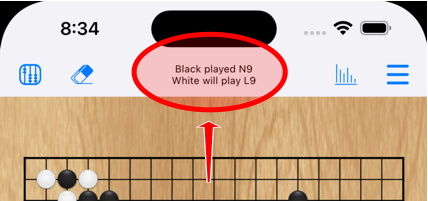
The user interface always shows the Status Text in the same location, independent of the device orientation: Near the top of the screen, right above the game board.
The Status Text shows the following information when Play mode is active.
- Information about the most recent and the next move. Examples:
- Black played K13. White to move.
- Black played N9. White will play L9. (when viewing the board position for a node that is not the most recent node in the current game variation)
- If the game has ended: Information about the most recent move and the game ending reason. Examples:
- Black passed. Game has ended by two consecutive pass moves.
- Black played K13. White resigned.
- While you are placing a stone: Continuous feedback about which intersection you are trying to place the stone on. Also if placing the stone would be illegal the reason why it is illegal is shown. Examples:
- Q18.
- B1 - Cannot play: Suicide.
- B1 - Cannot play: Ko.
The Status Text shows the following information when Scoring mode is active.
- While a score is being calculated: “Scoring in progress…”
- Once a score has been calculated: The calculated score + what happens when you tap on a stone. Examples:
- Black wins by 5½ - Tap to mark dead stones.
- Game is a tie - Tap to mark stones in seki.
- White wins by 3 - All stones on the board are deemed alive. (if the game has ended due to 4 pass moves while the “Four passes” game rule is set to “End game”)
The Status Text shows the following information when Board setup mode is active.
- The Status Text always shows the following message: “Tap to place or remove stones.”
The Status Text shows the following information when Markup editing mode is active.
- Instructions how to place the currently selected type of markup. Examples:
- Tap to place or remove a symbol / number marker / letter marker / label.
- Drag to place a line / an arrow.
- Tap on markup to remove it. (when the Eraser tool is selected)
- While you are placing a line or arrow, or dragging a piece of markup to a different intersecton, or erasing markup: Continuous feedback about the interaction. Examples:
- C5 - Drag to other intersecton. (when placing a line or arrow)
- C5 - D5. (when placing or moving a line or arrow)
- B1. (when dragging a symbol, marker or label to a different intersection)
- Erase markup on intersecton - C5. (when erasing markup on a single intersection)
- Erase markup in area - E6 : G7. (when erasing markup in an area)
In any of the modes, whenever the computer player is calculating something for a prolonged time then the Status Text shows information about the process. Examples:
- <Computer player name> is thinking…
- Computer is playing for <Human player name>…
- Calculating move suggestion…
- Updating player influence…