
The game result
When a game ends you may want to record an overall game result. To do so:
- Activate the Play area of the app.
- Tap the Game Info button.
- Select the “Score” tab.
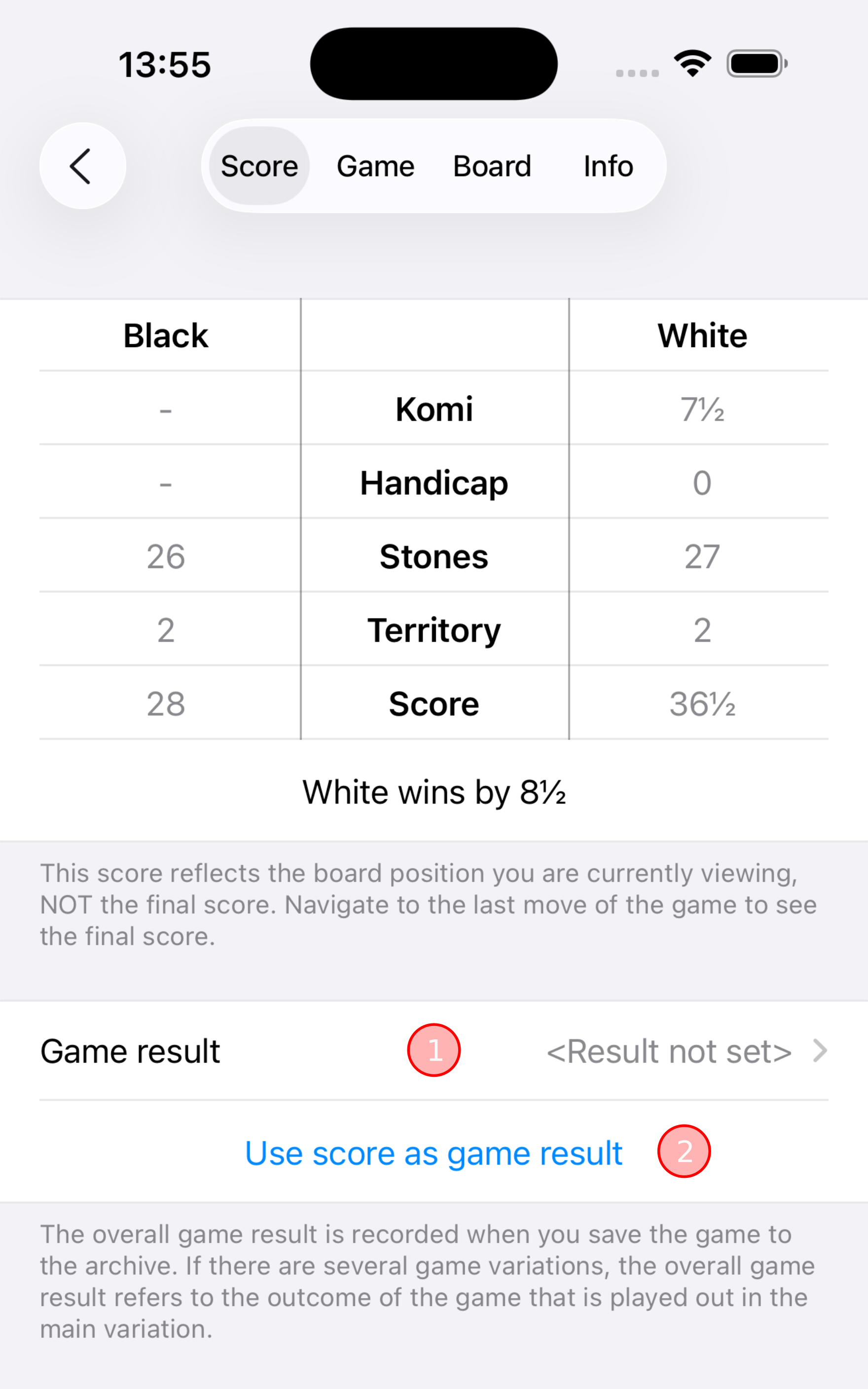
Below the scoring information table there is a section for viewing and editing the game result, as shown in the illustration on the right.
The first item ① displays the current game result. Tapping the item calls up a screen that lets you change the game result, or discard the game result. The illustration shows what the app displays when no game result is set.
The button “Use score as game result” ② is a convenient shortcut with which you can quickly set the game result to reflect the data in the scoring information table, without having to manually enter that data.
TipThe app supports recording game results that do not include a score. A player resigning is just one example. Read on to learn more.
InfoThe game result is preserved when you save the game to the archive. When you load the game again from the archive later on, the game result will be restored.
The app supports only a single game result per game. If there are several game variations, the game result refers to the outcome of the game that is played out in the main variation.
The rationale behind the limitation is that game variations represent analytical branches, or alternative lines of play, within the same game. Game variations are used for exploring or analyzing the same game. Since the actual game that was played is stored in the main variation, the game result logically also belongs to the main variation.
See the Game variations manual page for details on variations.
ReminderBecause of what was said above, keep in mind that when you select a non-main variation to be the current variation, and you view or change the game result, you are not viewing or changing the result of the currently selected non-main variation - you are viewing or changing the result of the main variation.
InfoThe app’s limitation for supporting only a single game result, instead of supporting a different game result per distinct game variation, is actually rooted in the SGF specification, which allows storing only a single “RE” (= result) property per distinct game. See the Smart Game Format (SGF) manual page for details on the SGF file format.
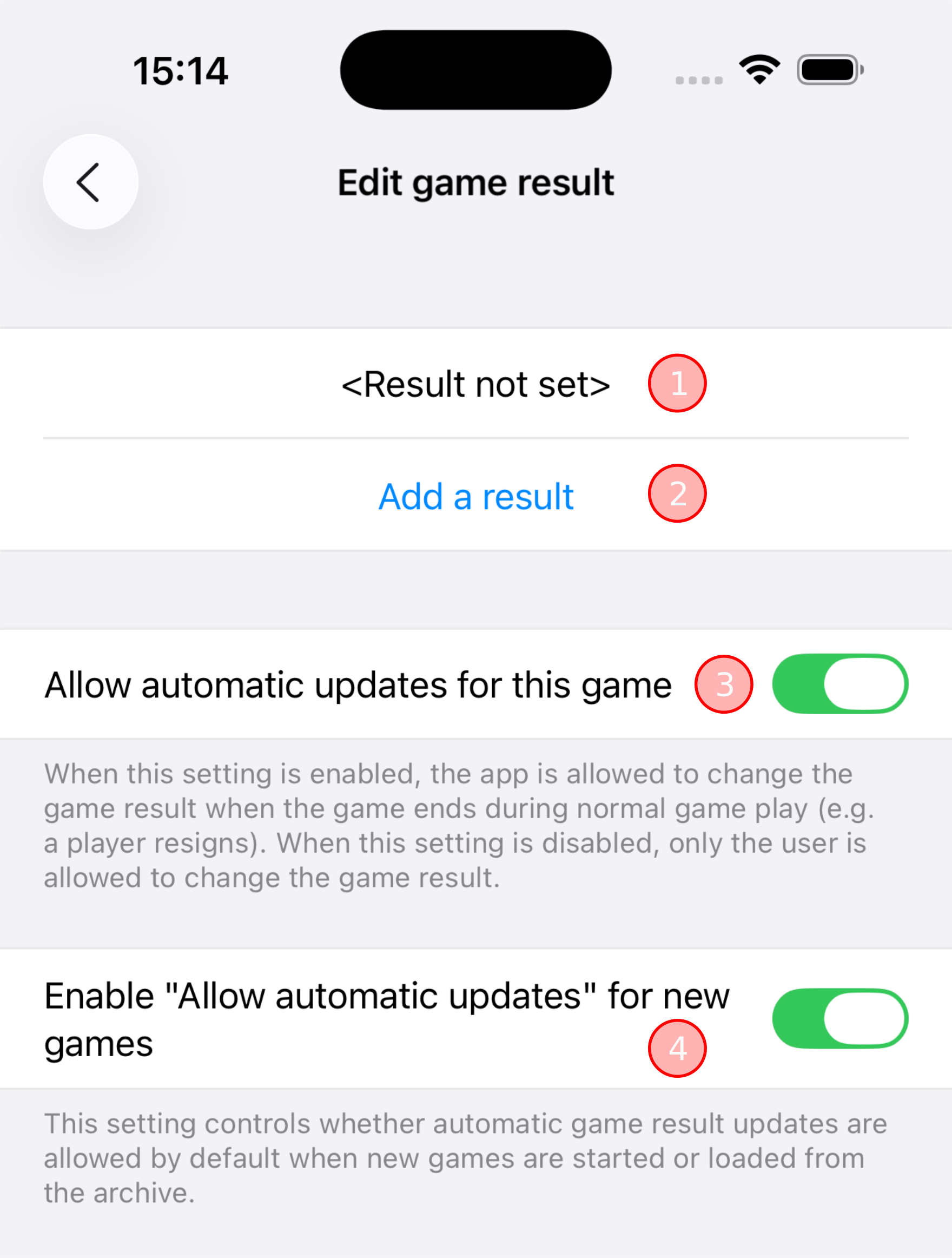
When no game result is set, as indicated by the first item (①) in the illustration on the right, you can add a game result by tapping the “Add a result” button (②).
TipThe options that control automatic updates of the game result (③ and ④) are discussed further down on this page.
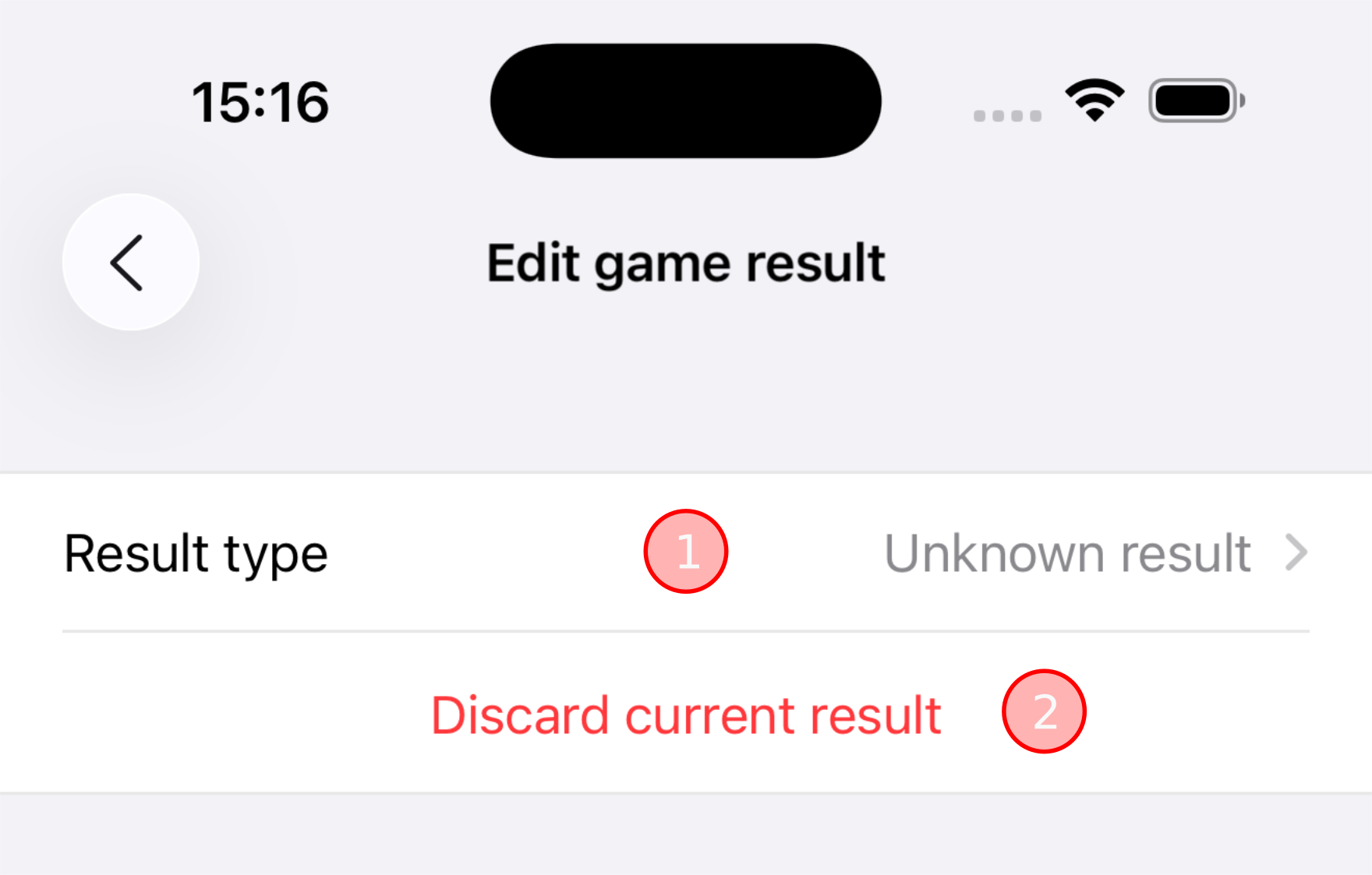
Adding a game results initially sets the game result to the default value “Unknown result”, as shown in the illustration on the right. This expresses that the game did end with a result, but further details are not known.
Tapping the “Result type” item (①) calls up another screen where you can choose from other result types. See the next section for details.
Once a game result of any kind has been set, it can also be removed again by tapping the “Discard current result” button (②). Tapping the button will return you to the screen as illustrated in the Adding a game result section above.
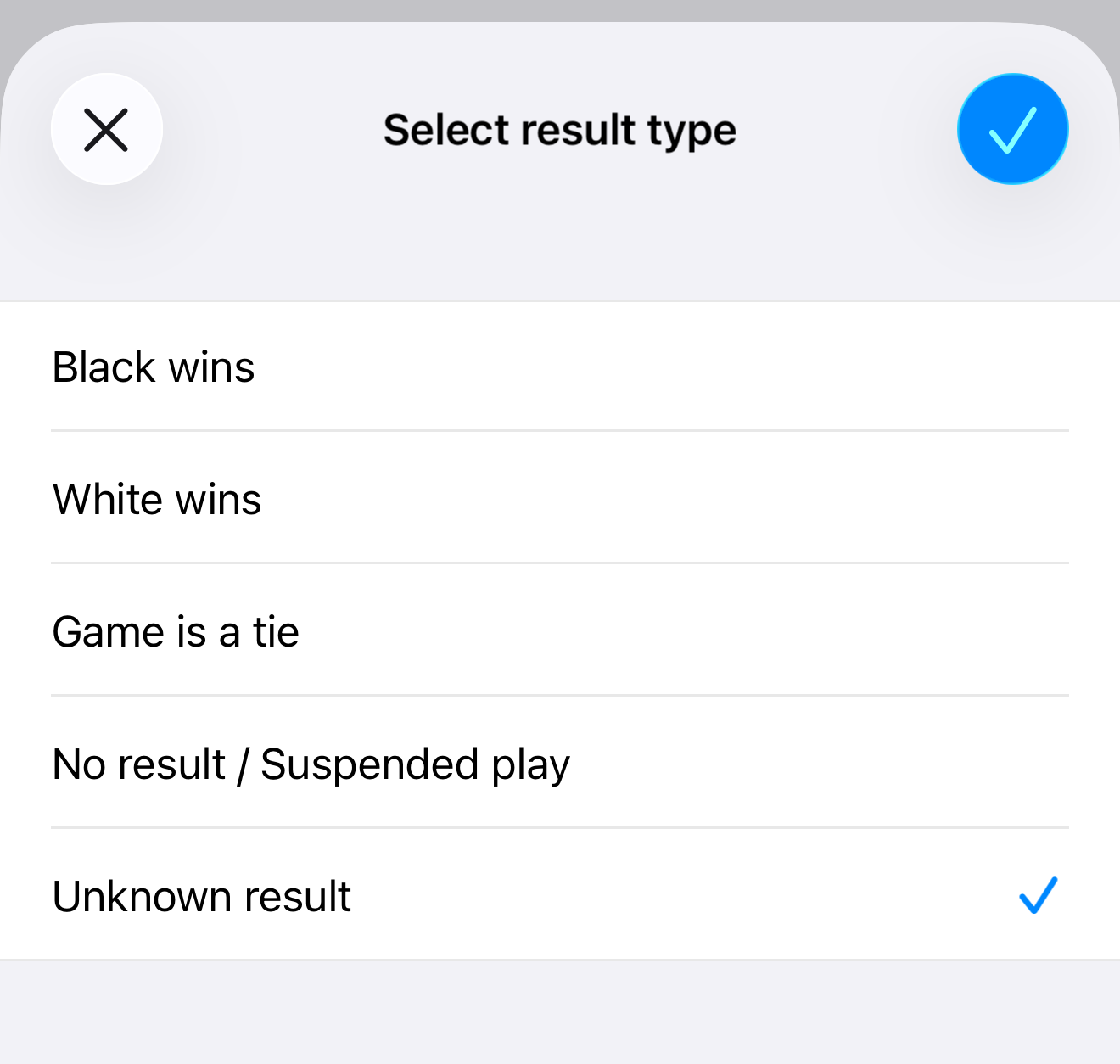
As explained in the previous section, tapping the “Result type” item calls up a screen (shown in the illustration on the right) where you can select one of the result types supported by the app.
| Result type | Description |
|---|---|
| Black wins | The black player wins the game. The nature of the win is further detailed by a “win type”. See the next section for details. |
| White wins | The white player wins the game. The nature of the win is further detailed by a “win type”. See the next section for details. |
| Game is a tie | The game ends with a draw (jigo). See Sensei’s Library for details. |
| No result / Suspended play | The game ends with “no result”, or with suspended play (i.e. the game was never finished). “No result” may result, for instance, when neither player is willing to break an infinite cycle of play. When a “no result” occurs, the game is treated as if it was never played. See Sensei’s Library for more details. |
| Unknown result | The game ends with an unknown result. Further details are not known. |
TipFor the result types “No result / Suspended play” and “Unknown result”, if additional information is available it may be useful to record it in one of the items available on the “Info” tab of the Game Info screen (see the Game info screen manual page), or in a short or long description annotation (see the Annotations manual page).
As explained in the previous section, when you select the result type “Black wins” or “White wins”, the nature of the win is further detailed by a “win type”. In other words, the “win type” indicates how exactly the player won the game.
As shown in the illustration on the right, the initial default win type is “Without score”. This expresses that the black or white player won, but further details about the score are not known.
Tapping the “Win type” item (①) calls up another screen where you can choose from other win types.
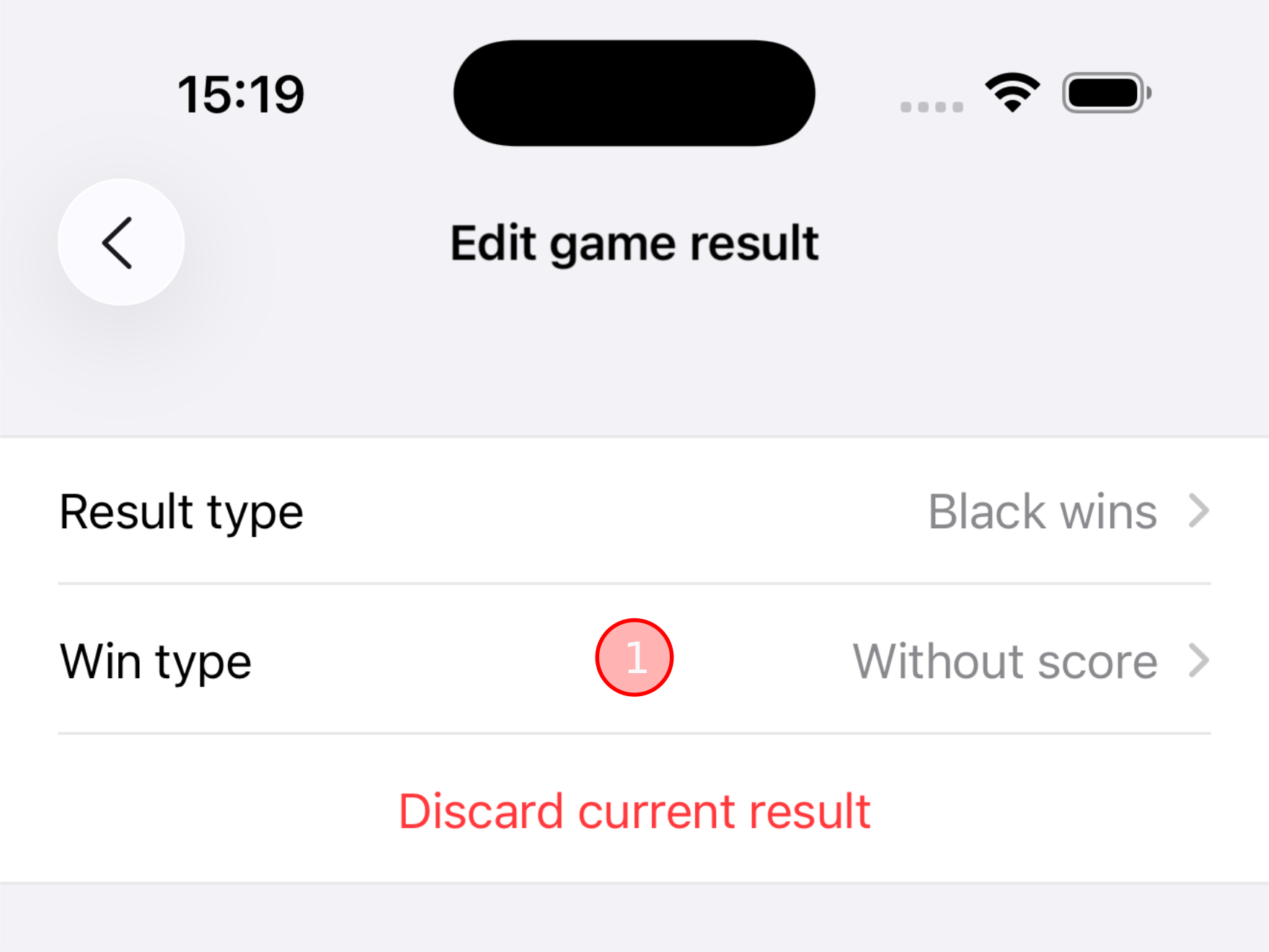
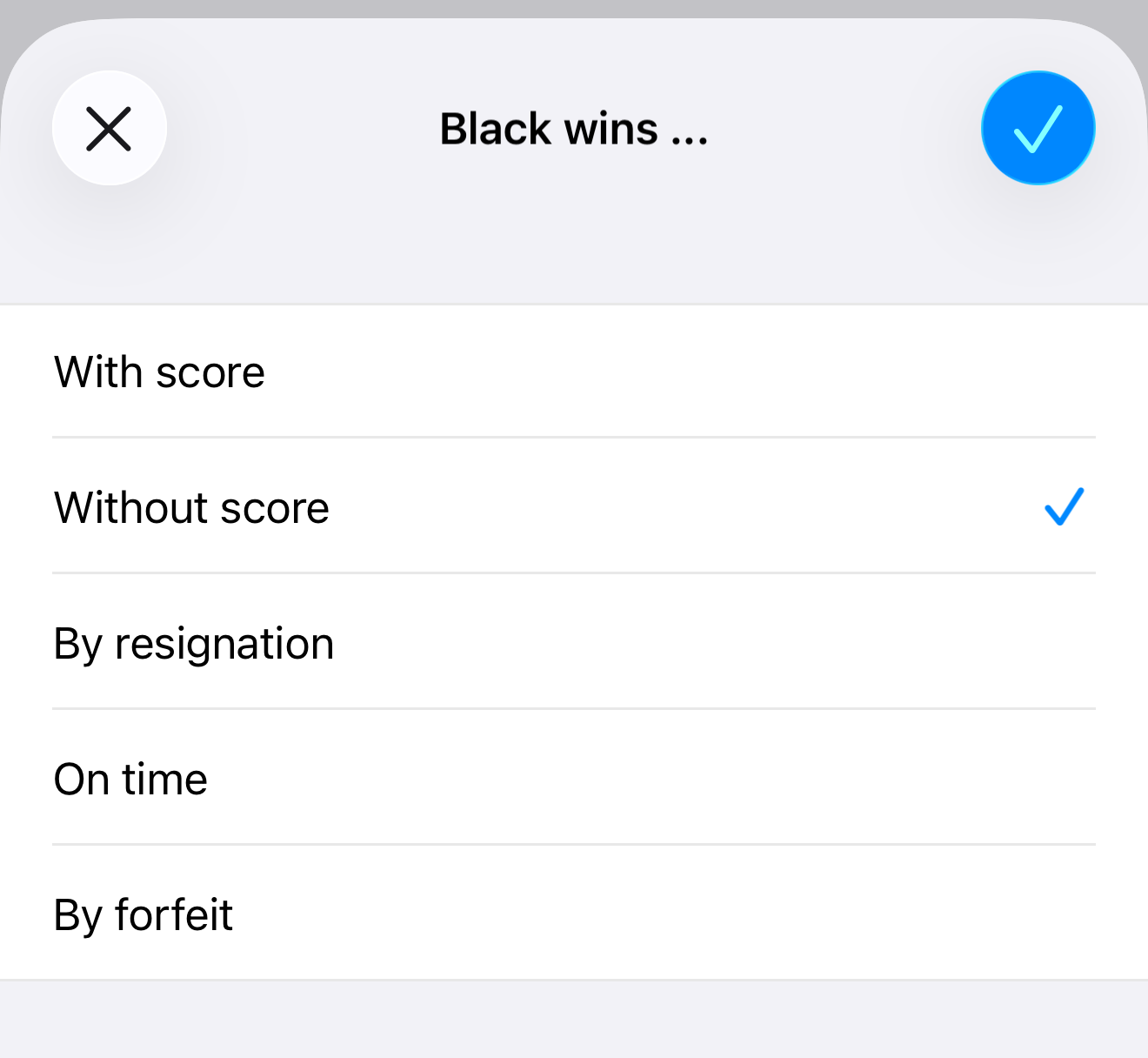
The app supports the following win types.
| Win type | Description |
|---|---|
| With score | The player wins the game by normal play. A score was established. The actual score is detailed by an accompanying non-negative numeric value. See the next section for details. |
| Without score | The player wins the game by normal play. No score was established, or the score was not recorded. |
| By resignation | The player wins the game because their opponent resigned. |
| On time | The player wins the game because their opponent ran out of time. See the Timed play manual page. |
| By forfeit | The player wins the game because their opponent forfeited the game. |
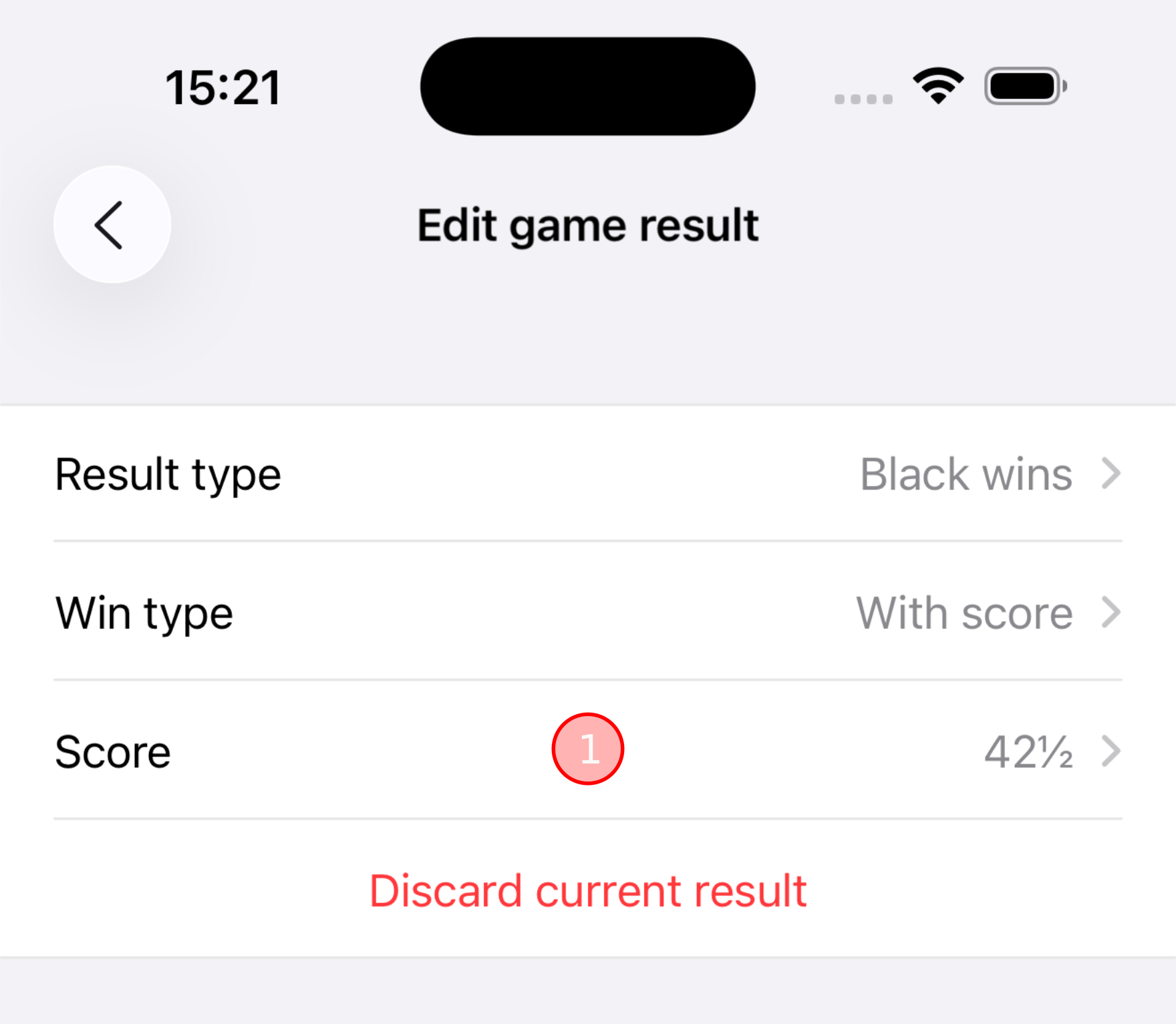
As explained in the previous section, when you select the win type “With score”, the player wins the game with an established score.
The default score is 1 (one), i.e. the player won by 1 point.
As shown in the illustration on the right, a “Score” item displays the actual score value. Tapping the “Score” item (①) calls up another screen where you can enter the score value (must be a non-negative numeric value). In the illustration, the value “42.5” was entered.
While you are playing the game, the app automatically updates the game result as follows:
- When you play the game and the game ends for any reason, the app sets the game result to match the game end state as closely as possible.
- Likewise, when you resume play after the game has ended, the app discards the current game result.
NoteBecause the game result is tied to the main variation, the app performs automatic updates of the game result only for game play that occurs in the main variation. See the Game result vs. variations section further up.
WarningIf you have manually entered a game result before the game ends, the app will overwrite this manually entered game result at the moment when the game actually ends. Likewise, the app discards a manually entered game result when you resume game play after the game has ended.
Here are the specific game result updates performed by the app.
| Game play action | Result type | Win type | Score | Remarks |
|---|---|---|---|---|
| Game ends due to pass moves | Unknown result | - | - | The app cannot calculate a score on its own and can therefore not conclude which player wins, nor by how many points. It is up to you to record the actual score. This is the reason why the “Use score as game result” button exists (see the Where to view or edit the game result section above). |
| Player resigns | Player (opposing color) wins | By resignation | - | |
| Player runs out of time | Player (opposing color) wins | On time | - | |
| Resume play after game ended due to pass moves | - | - | - | Discards the current game result. |
| Undo resign | - | - | - | Discards the current game result. |
| Undo timeout | - | - | - | Discards the current game result. |
| Undo forfeit | - | - | - | Discards the current game result. |
| Resume play by discarding a move | - | - | - | Discards the current game result. |
NoteThe purpose of automatic game result updates is a best-effort attempt to set at least some game result for games played by casual users who don’t care about maintaining a meticulous game record.
This best-effort approach is best seen when a game ends due to pass moves: In this case the game result is set with the very generic game result “Unknown result”, which has nothing to say about the actual outcome of the game beyond the fact that there was an outcome.
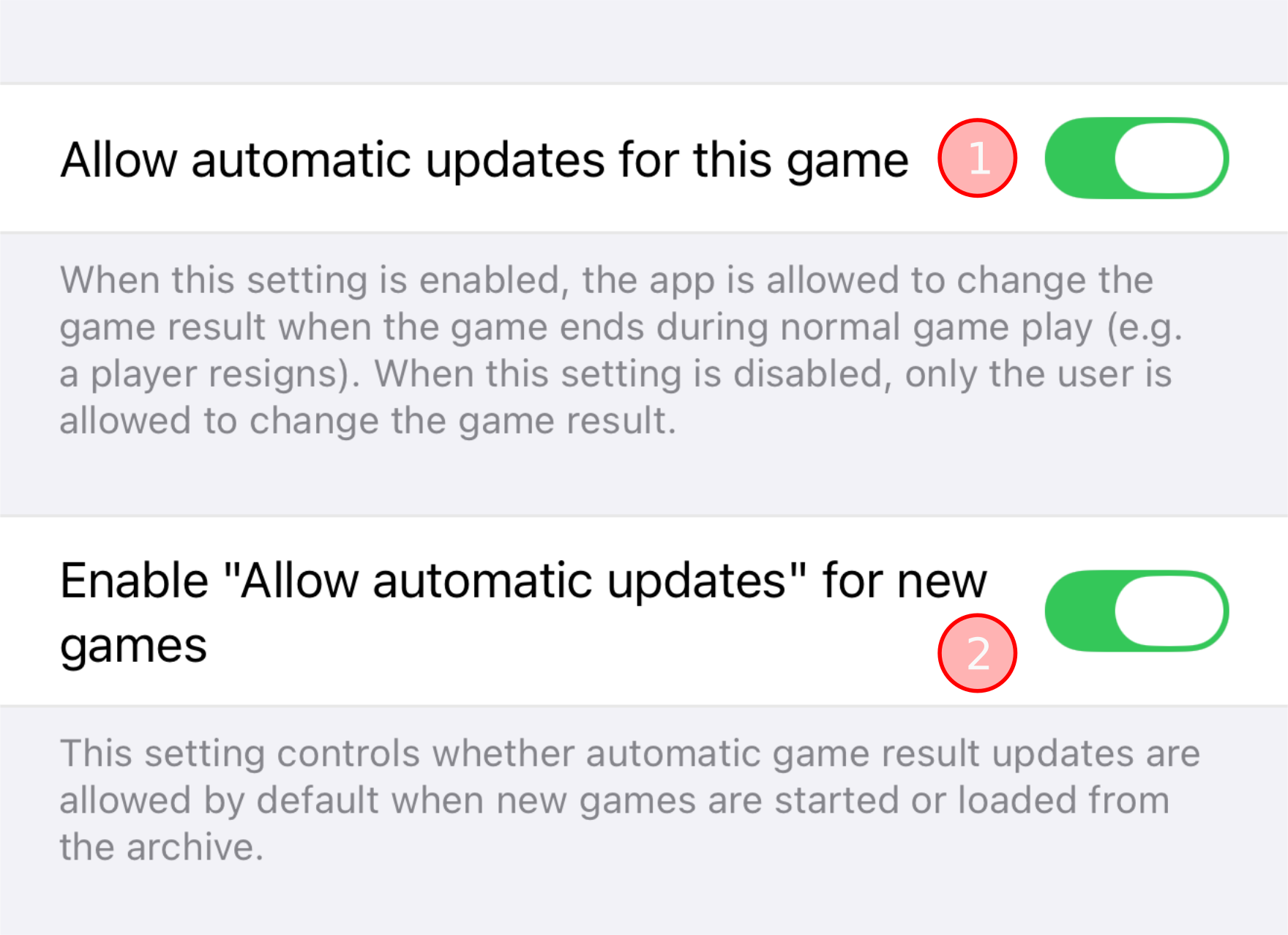
There are two options to enable or disable automatic game result updates. These options are found at the bottom of the “Edit game result” screen.
The “allow for this game” option (①) lets you enable or disable automatic game result updates for the current game only. The value you select for this option takes effect only as long as you play the current game. When you start a new game, or load a game from the archive, the value of the “enable for new games” option (②) is used for the new/loaded game.
NoteThe value you select for option ① is not preserved when you save the game to the archive.
The “enable for new game” option (②) is a user preference with which you select a default that takes effect when you start a new game, or load a game from the archive.
When several game variations exist, one of them is the current game variation. Using the tree view you may freely switch between variations at any time. For details see the Game variations manual page.
When you switch to a different variation and that variation is the main variation, the app sets the game state to “game has ended” in these cases:
- The game result indicates that a player won by resignation.
- The game result indicates that a player won on time.
- The game result indicates that a player won by forfeit.
All other game results do not have any effect on the game state.
TipThe app will set the game to “game has ended” if it detects that the last 2 or 3 moves of the newly selected variation are pass moves, but this has nothing to do with the game result.
See the End of the game manual page for details on the number of pass moves needed to end the game.
As explained in the Automatic game result updates section above, the app automatically updates the game result when the game ends, or play is resumed after the game has ended.
This section documents a couple of known scenarios when such an update occurs although you might not expect it.
- The current game variation is the main variation.
- A game result has been set.
- The user preference “New game variation insert position” is set to either “Above current game variation”, or to “Above all other game variations”.
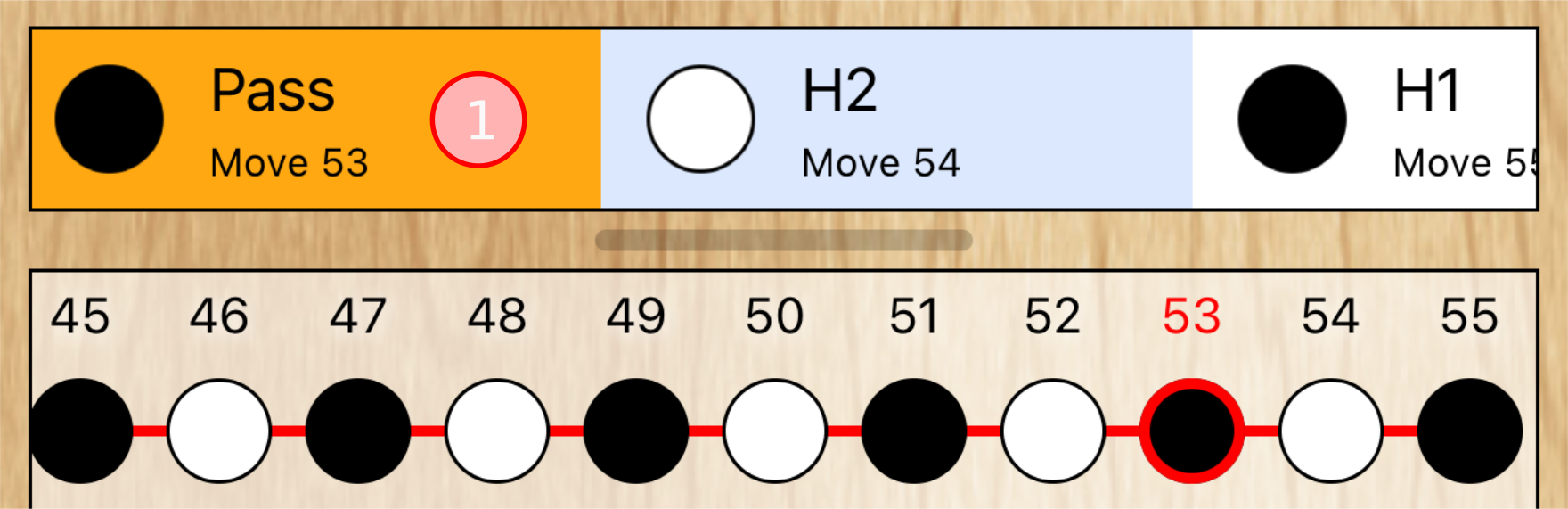
- You select a node (①) that is not the last node of the main variation.
- You play a move (②).
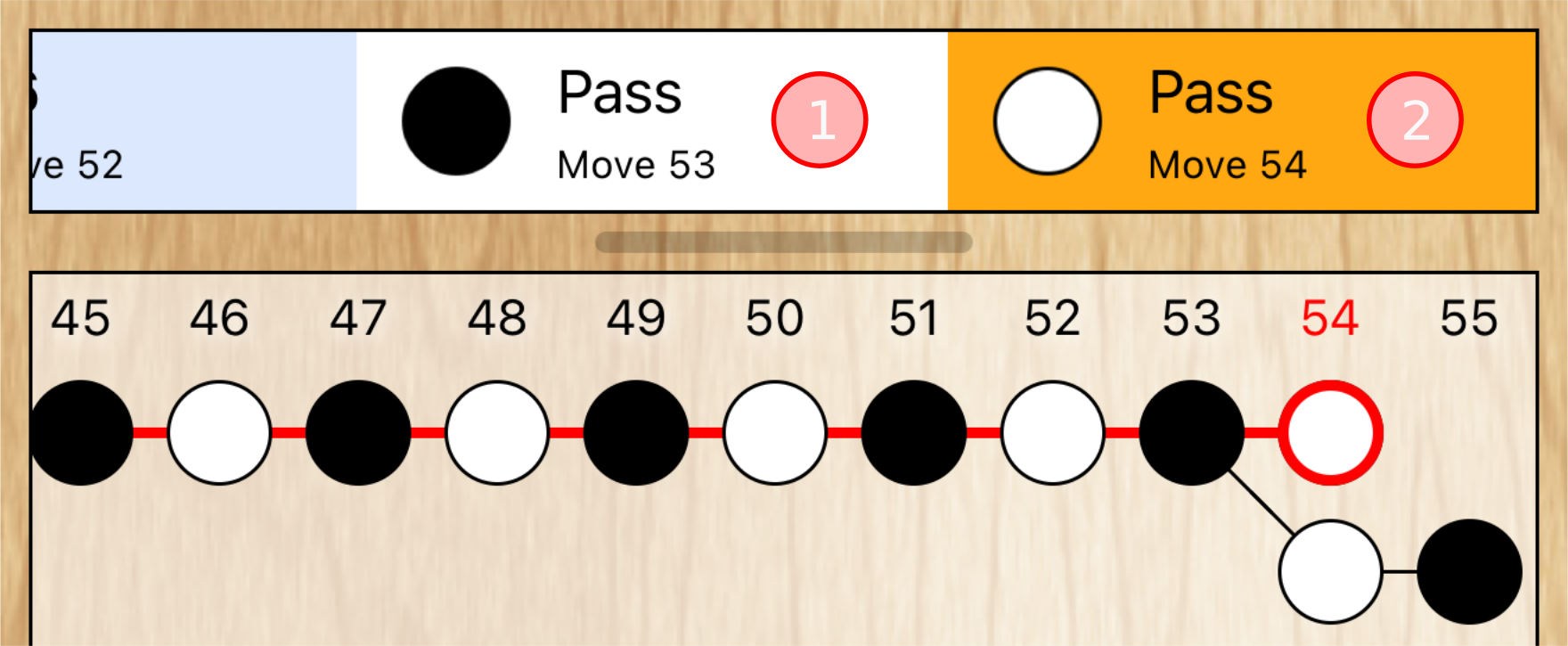
- The new move creates a new game variation which (because of the user preference) is inserted above the main variation. That new variation is promoted to become the new main variation because it is now the top variation.
- The app discards the already existing game result and, if the new move caused the game to end (which it does in the illustration on the right because both ① and ② are pass moves), sets a new game result to reflect the state of the new main variation.
- The current game variation is the main variation.
- A game result has been set.
- Another game variation exists.
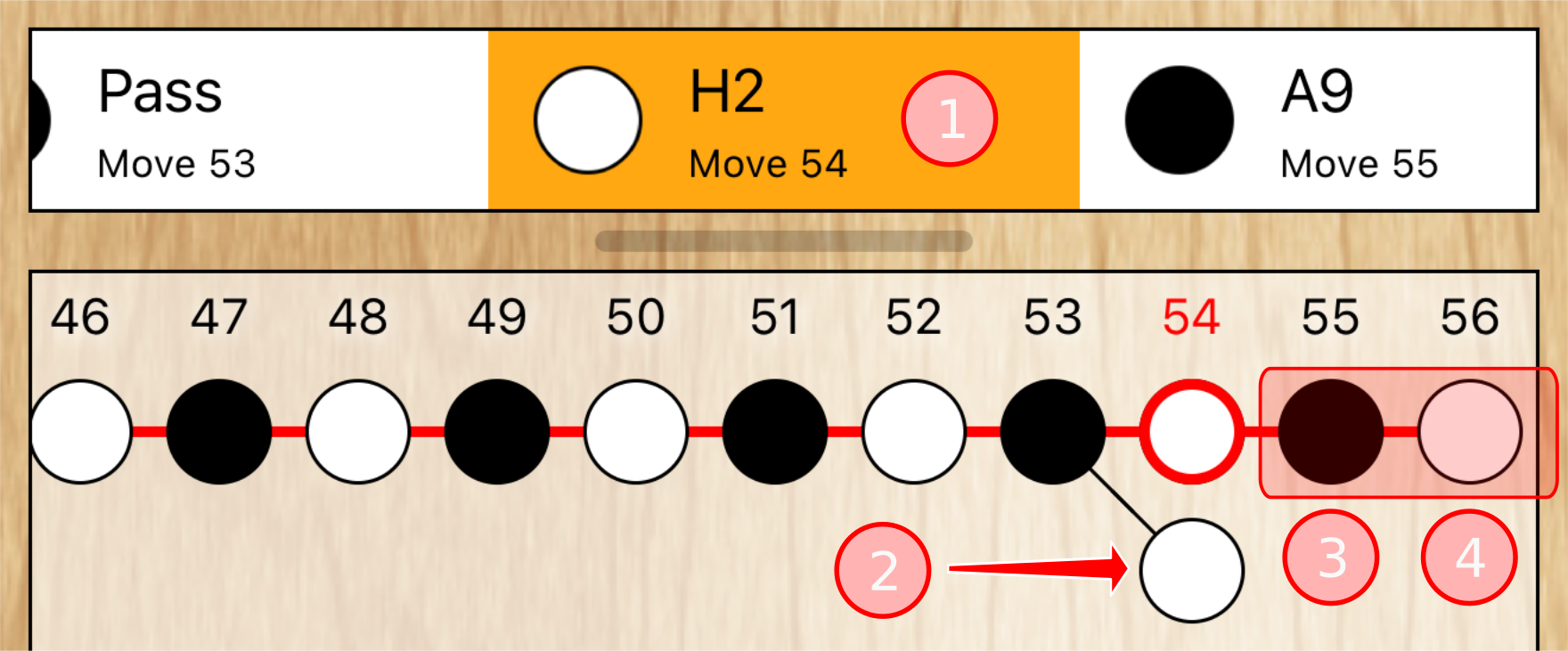
- The currently selected node (①) is the first node of the main variation where the main variation deviates from the other variation (②).
- You discard the currently selected node (①), and all future nodes if there are any (③ and ④).
- The non-main variation is promoted to become the new main variation because it is now the top variation.
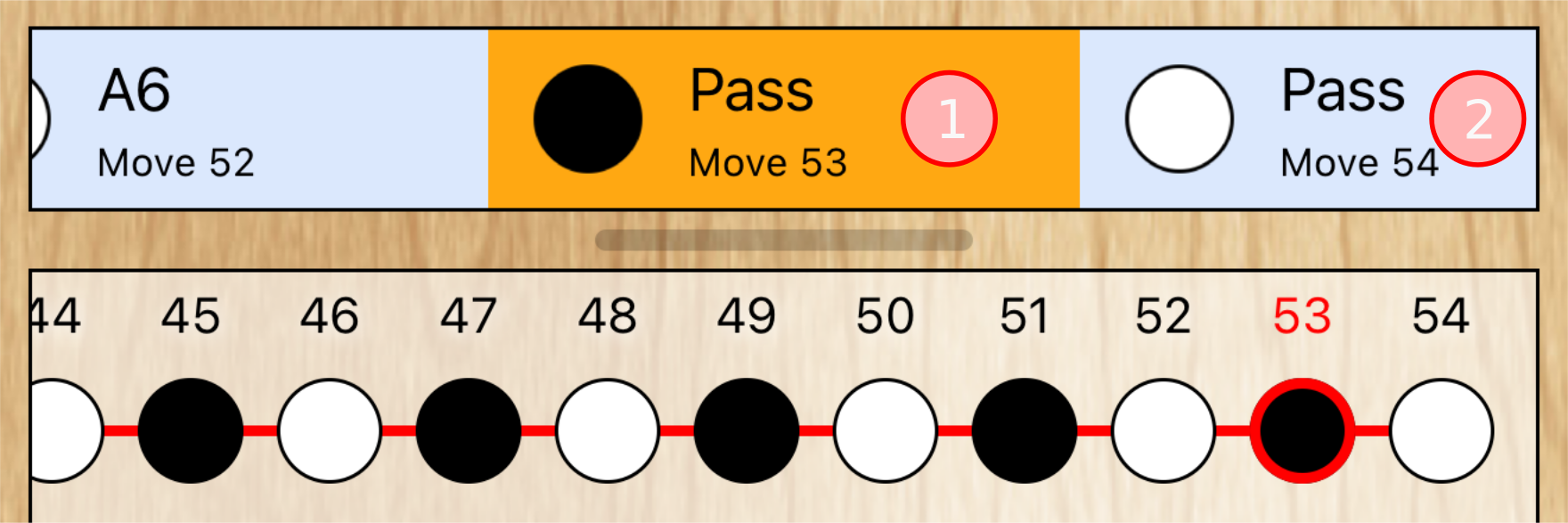
- The app discards the already existing game result and, if the last moves of the newly promoted main variation (① and ②) are pass moves that cause the game to end (which is the case in the illustration on the right), sets a new game result to reflect the state of the new main variation.
For the technically inclined, the game result is read and written from/to the SGF property “RE”.